Labels

THIS BLOG IS ALL ABOUT TECHNOLOGY. PLEASE DO VISIT THIS BLOG DAILY FOR LATEST TECHNOLOGY. AND KINDLY DO FOLLOW THIS BLOG.

Sunday, January 2, 2011

HOW TO: Your Get Your Old PC Running Like New Again

Michael Smith has been the IT Manager at TrialPay for three years, where he supports a wide variety of computer systems for 100 employees. TrialPay works with more than 10,000 companies in social games and software, including CNET, which is offering a special “New Year, New PC” bundle.
Now that the new year is upon us, many people may be thinking about dumping their slower, outdated hardware and starting with a clean slate. But why shell out hundreds, if not thousands for a new system? There are several ways to give your PC a makeover that will get it running as good as new for much less.
Here are four things to try.


1. Do More With Less


Running too much software on your computer can eat up your hard drive space and degrade performance quickly. Be efficient when selecting software; only get what you need and use one solution instead of two when possible. Here are a few areas where you can cut corners:
Antivirus software: Choose an antivirus product that protects your computer from viruses, spyware and adware. There’s no need to purchase a separate solution to protect your computer from each when most of the top brands offer comprehensive protection. Using just one application for protection will decrease the number of programs running on your machine at the same time.
PDF tools: The top PDF tools offer more features than the average consumer actually needs. Try the lite version where possible, or try Foxit’s PDF Creator. It’s a great, lightweight alternative that uses less space on your hard drive and won’t slow down your computer.
File compression utilities: File compression utilities allow you to compress files to reduce their size and open compressed files without using a lot of disk space. By using the software to compress your files, you can actually get more mileage out of your hard drive and backup drive instead of purchasing a larger one.
An uninstaller program is also a nice add-on to the products above ― it can help remove all of the “helper files” related to software programs that you might not be able to remove on your own. You can find several highly rated freeware or shareware programs at Download.com.


Disclosure: Foxit Software’s e-commerce platform is provided by Trial Pay.

2. Add More RAM to Boost Speed


When you run any application on your computer, it uses part of your RAM (Random Access Memory). When you don’t have enough RAM, your computer runs significantly slower. Adding more RAM to your computer can give you an easy speed boost. Newer applications require more RAM, so even if you don’t run a lot of applications at once, an older PC might need an upgrade.
Crucial has a great tool to help you determine exactly what you need. Just enter the make and model of your PC, and Crucial tells you your current system specifications and the maximum RAM capacity that your computer can handle. It even provides excellent guides to help you install RAM yourself and troubleshoot problems, and it’s also a great place to get good deals on memory.
The installation process is straightforward (and even easier for laptops than desktops), so you can do it yourself. HowStuffWorks.com has created easy-to-follow installation videos for installing RAM. The desktop RAM video is here, and the laptop RAM video is here.


3. Move to the Cloud


Using more than 80% of your hard drive space can make your computer sluggish over time. Most experts agree that you should leave about 15% to 20% of your disk space free. If you’re maxing out your hard drive space, you don’t need to buy a new computer or install a larger hard drive. Instead, you can move your files to the “cloud,” which is a set of technologies and services that allow you to do normal computing tasks over theInternet in real time. For example, instead of storing your pictures on your hard drive (which could take up several gigabytes of space), you can put them on a photo-sharing site (Picasa, Facebook,Photobucket, etc.) or a free online file storage tool like DropBox.
Online backup solutions are a great way to get more mileage out of your hard drive. You can look at online backup solutions, such as Mozy, SugarSync or Carbonite, or you can get an external hard drive with backup software. For some excellent advice on setting up an external hard drive backup system, check out thisLifehacker guide.
Online backup solutions are the most convenient way to store your files because you can access them from any computer, as long as you have a good Internet connection. External drives can be heavy and cumbersome when traveling, and you risk losing all of your files if the drive is damaged or misplaced. However, online backup solutions are more costly than external drives. Most services charge a recurring monthly or yearly fee, whereas external drives are a one-time expense.

4. Wipe Your Computer


If your computer still doesn’t perform as good as new after trying the previous tips, consider restoring it to its factory settings. Identifying and repairing every issue affecting your computer’s performance can be time-consuming and difficult (even for advanced users). Starting from scratch allows you to remove everything lurking in your system that might be slowing it down. In fact, it’s the only way to be completely sure that you’ve removed harmful viruses or trojans.
Before wiping your computer, make sure you have an effective backup solution to store your documents, media files (video, photos, music, etc.), web browser settings, bookmarks, saved game files, and any other files that you can’t do without. Browser settings and bookmarks can be exported directly from your browser. Game files are trickier because every game is different. You might be able to copy the files from your game’s program directory file, but you should visit the official website for each of your games for specific instructions.
Then, identify the programs that you want to keep on your computer (games, antivirus software, Office, etc.). You will need to locate the installation disks, product keys or download links for each program that did not come with your computer when you purchased it.
Most computers come with a recovery disk, so when you’re ready to take the plunge, just pop in the disk and choose the “Restore” option. However, some computers don’t have recovery disks. Instead, this information is stored on a small portion of the hard drive that is partitioned from the rest of your data and will not be erased upon restoring the computer. See the manual that came with your computer for further instructions as this process will vary.
In any case, make sure you have your Windows product key. This key might be printed on a sticker somewhere on your computer or in the materials you received when you purchased the computer. You may be asked for this when restoring your computer.
For a more comprehensive tutorial, this Lifehacker guide has an excellent step-by-step guide for restoring your system. The entire process could take you all day, so be prepared to spend a lot of time on this.


Don’t Depend on iPhone Clock’s Alarm Tomorrow [UPDATED]


Many of us like to use the iPhone as an alarm clock, but if you’re thinking about setting a one-off alarm to wake you up Sunday morning (January 2, 2011), don’t do it.
Twitter was abuzz with complaints and comments about the iPhone bug that failed to wake up those who depended on it Saturday morning, so we wanted to be sure you knew about the problem so you wouldn’t make the same mistake when setting your alarm.
UPDATE: There’s a workaround: If you still want to use the iPhone clock as an alarm for tomorrow, set a recurring alarm and it’ll work normally, Apple told Engadget (see quote below).
The good news? You won’t need to fiddle with this forever, because the iPhone bug will somehow right itself Monday, as soon as the calendar changes over to January 3, 2011. Even so, this was a rude awakening for New Year’s Day. Come on Apple, fix this bug.
Meanwhile, might I suggest an alternative alarm clock for iPhone, iPad and iPod touch? It’s Best Alarm Clock, a trusty $.99 app that wasn’t affected by this bug. It lets you choose to wake up to a variety of sounds, iPod music, or my favorite, a single vibration.
While I could do without most of its garish colors and sound effects accompanying each tap of an icon, it has other virtues, such as helpfully displaying a current weather report. I especially like the way you can program different wake-up times for each day of the week, great for those of us with flexible schedules:
Don’t like that one? Here are five other worthy choices.
UPDATE: Engadget got the following response from Apple:
“We’re aware of an issue related to non repeating alarms set for January 1 or 2. Customers can set recurring alarms for those dates and all alarms will work properly beginning January 3.”

Wednesday, December 29, 2010

1,000-Core Chip Could Make PCs 20 Times Faster

Scottish scientists have built a 1,000-core processor, claiming it will run 20 times faster than today’s chips while using less power.
Dr. Wim Vanderbauwhede led a research team at the University of Glasgow to create the futuristic processor using a programmable chip called a field programmable gate array (FPGA).
Instead of the built-in circuitry of conventional desktop computer chips, these processors can be customized. So with some extremely clever programming, the research team was able to divide the processor into 1,000 cores, each capable of its own computation.
To give you some perspective, the fastest consumer processors such as Intel’s Core i7 top out at six cores. According to the Daily Mail, the 1,000-core processor processes 5 gigabytes data per second, and that’s “20 times faster than modern computers.”
The researchers gave each one of the cores its own dedicated memory, speeding it up even more. Remarkably, they were able to leverage all this extra speed and power without using more energy. Because they’re using those more energy-efficient FPGAs, Dr. Vanderbauwhede calls them “a greener option.”
Will we be seeing these processors in our laptops anytime soon? Not exactly. The team will present their research at a symposium next March, but according to Vanderbauwhede, “I believe these kinds of processors will only become more common and help to speed up computers even further over the next few years.”

HP Discounts Envy 13; Is a New Ultrathin Laptop on Its Way?

Remember Envy 13? It was HP’s answer to Apple’s Macbook Air – a stylish and capable yet ultrathin and 
ultraportable laptop. Now HP has slashed its price to only $999, after a $450 instant rebate.
The real news here is the possibility that HP is trying to get rid of its remaining inventory and make room for a new ultrathin laptop, and it wouldn’t be too far fetched to assume it might show it next week at CES. The Envy 13 has been around quite a while now, and it currently isn’t even featured on HP’s official Envy page, which is now populated by 14-inch, 15-inch and 17-inch models.
Now, the Envy 13 is a decent pick for the price, with an aluminum chassis, a 13.1-inch, 1366×768 screen, an 1.6GHz Intel Core2 Duo CPU, 3GB of DDR3 RAM, a 250 GB, 5400RPM hard drive and 2 USB ports.

Americans Don’t Want the FCC to Regulate the Internet [STATS]

A new survey from Rasmussen Reports reveals that just one in five American voters want the 
Federal Communications Commission (FCC) to regulate the Internet, placing their faith instead in free market competition to protect the Internet’s U.S. users.
Rasmussen asked 1,000 likely U.S. voters, “Should the Federal Communications Commission regulate the Internet like it does radio and television?” Only 21% of those polled responded affirmatively, while a whopping 54% stated that they opposed FCC regulation of the Internet. One in four said they were not sure.
According to Rasmussen, the Republicans and independent voters surveyed, “overwhelmingly opposed FCC regulation of the Internet,” while Democrats were more evenly divided on the issue.
When asked whether government regulation or free market competition was a better mechanism to protect Internet users, 52% chose free market competition, while only 27% said government regulation was the best option. Again, Republicans and independents chose free market competition by a wide margin, but a plurality of Democrats said regulation was the answer (46%). Part of the reason for their choice was because the majority of likely U.S. voters polled (56%) say the FCC would use its authority to promote a political agenda, while only 28% disagree with that assertion.

We Need to Find the Net Neutrality Balance


We’re not surprised by the results of the Rasmussen poll, but here’s one reason why we believe they’re opposed to FCC regulation:
“The issue has attracted little public notice. Just 20% are following news of the net neutrality regulations Very Closely. Another 35% say they’re following it Somewhat Closely.”
Net neutrality is a complicated subject filled with many factions and lots of nuances that can only be found in the detailed government paperwork the FCC and the courts have been generating for the last few years. Last year, the FCC stepped in to mandate net neutrality for the web. Internet activists cheered the move, but U.S. courts ruled that the FCC doesn’t have the authority to make such mandates.
The FCC skirted around the issue by making Internet lines subject to the same rules as telephone networks, but work on net neutrality slowed down. Then Google and Verizon made its controversial open Internet document, which proposes that different rules should apply to wireless networks.
The FCC wasn’t happy with Google and Verizon for essentially going over its head, but eventually the FCCapproved an Open Internet Order that included many of Google and Verizon’s proposed rules. Now the FCC’s authority to regulate the web is being questioned by Congress and the issue could easily make its way back to court.
No wonder the vast majority of the American public aren’t paying attention; how can anybody be expected to follow all of these developments when they have a work and family life to manage? It’s a classic case of rational choice theory.
As we’ve written before, without net neutrality regulations, Internet service providers (ISPs) could have free reign to discriminate against the transmission of certain types of data, like video. Here are some of the potential worse case scenarios just to get started.
Excessive government regulation can stifle innovation, but a lack of intervention could turn the Internet into a wild west where Comcast, Verizon and other ISPs create fast tracks for some content while making it impossible for Internet users to access other websites. We need to find the right balance of net neutrality regulation that keeps the web open but doesn’t restrict the impressive innovations that have contributed to the rise of Facebook, Google and thousands of web startups.

Nokia E7 to Arrive on January 13th in the US


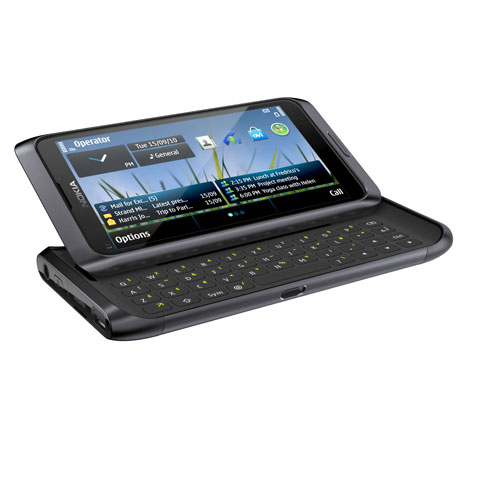
Nokia E7Nokia E7, the business-oriented brother of Nokia's high-end N8 mobile phone, is expected to make an appearance on the market in the United States come January 13th, some of the latest news on the matter suggest.
The handset was originally said to be on its way to the market before the end of the ongoing year, but the launch date slipped to January for most countries, including the United States. 

However, January is shaping up to be the month that would bring the new mobile phone to the market in various countries, and January 13th is said to be the arrival day in the US.

According to a recent article on The Nokia Blog, this is the date when a major US retailer would receive the Symbian^3 phone, which is a little over two weeks from now.

The news site offers some info on the price tag for this device as well, suggesting that it would be released on the local market for around $599, though the suggested retail price is USD $679.

“To ensure the best possible user experience on the Nokia E7, we have decided to begin shipping it in early 2011,” is what Nokia had to say on the shipping date for this device.

All in all, it appears that it should not be too long before we have the possibility to enjoy a brand new Symbian^3-based device from Nokia, following the launch of Nokia N8, Nokia C7 or Nokia C6-01.

For those who might have not encountered this device before, we should note that it sports similar looks with the N8, to which it adds a sliding QWERTY keyboard, to offer more functionality to users.

Nokia unveiled this mobile phone back in September this year, when it announced the other Symbian^3 devices too, all of which are already shipping top end users. Hopefully, the Nokia E7 would start arriving on shelves in mid-January too, or soon after.

Apple faces suit over app privacy leaks


Complaint accuses Apple and others of using apps to breach users' privacy, and says Google could also face action
iPad Steve Jobs
Apple CEO Steve Jobs with the iPad. Apple has been accused of allowing apps on the iPhone and iPad to transmit users’ personal data to advertising networks. Photograph: Ryan Anson/AFP/Getty Images
Apple and five other companies have been accused of allowing applications on the iPhone and iPad to transmit users' personal information to advertising networks without consent, in a legal complaint filed in the US.
The firm filing the complaint on behalf of two groups of Apple users says it could also be levelled against Google over its Android mobile operating system for the same reasons.
The complaint is seeking "class action" status. It was filed on 23 December in the US federal court in San Jose, California, according to Bloomberg.
The lawsuit notes that iPhones and iPads contain unique identifying elements – known as the Unique Device Identifier, or "UDID" – which let advertising networks to track what applications users download, how frequently they're used and for how long. Users cannot block the transmission of the UDID, a 40-character string that uniquely identifies each device.
"Some apps are also selling additional information to ad networks, including users' location, age, gender, income, ethnicity, sexual orientation and political views," the lawsuit, filed on behalf of Jonathan Lalo of Los Angeles County, alleges.
The issue of how much data about individual users is leaked to the creators of apps has become a hot topic in recent months following investigations which suggested that some gather more data than they strictly require to operate without notifying the user or providing any way to monitor what is sent.
Apple has come under the spotlight, but a number of applications for Google's Android have also been identified as potentially infringing on privacy.
Apple's iOS – for the iPhone, iPod Touch and iPad – and Google's Android are used in millions of mobile devices around the world. Iin the third quarter of 2010, Apple had about 17% of the global smartphone market, and Android roughly 25%, according to the research group Gartner.
Lalo's suit identifies applications such as Pandora, Paper Toss, the Weather Channel and Dictionary.com, and names them as defendants along with Apple. Lalo is represented by Scott Kamber and Avi Kreitenberg of KamberLaw LLC in New York.
A similar suit filed by four people on the same day calls Apple's actions "an intrusive tracking scheme" and calls Apple's failure to keep the apps out of the store and realise that they breach privacy as "aiding and abetting" their privacy invasion.
Apple claims it reviews all applications on its App Store and doesn't allow them to transmit user data without customer permission, according to Lalo's complaint. Apple's rules for applications says: "Apps cannot transmit data about a user without obtaining the user's prior permission and providing the user with access to information about how and where the data will be used."
The lawsuit claims that the transmission of personal information is a violation of federal computer fraud and privacy laws, and seeks class-action status for Apple customers who downloaded an application on their iPhone or iPad between 1 December 2008, and last week.
However, analysts were unfazed. Global Equities Research analyst Trip Chowdhry told Reuters the lawsuits would have little impact on investors.
"If this were a major issue, all web browsers would have to shut down and there would not be any advertising on the internet," Chowdhry said.